New Item Unlocked: Audiobook Converter
Some audiobooks show up as one tidy file. Others show up as a pile of separate chapter files: Chapter 1, Chapter 2, all the way to Chapter 47. That’s annoying in a player, and even more annoying when you’re running your own audiobook library like I am with Audiobookshelf and Sir Doug Fir Books.
So I made a little Mac app to fix it. It’s called Audiobook Converter.
ITEM CARD
- Name: Audiobook Converter
- Maker: Sir Doug Fir Audiobooks
- Platform: Mac, macOS 13 or later
- Power-ups: combine chapter files into one audiobook, MP3 → M4A
- Privacy: no internet access at all; your files never leave your Mac
STAGE 1 · ONE BOOK, MANY CHAPTERS
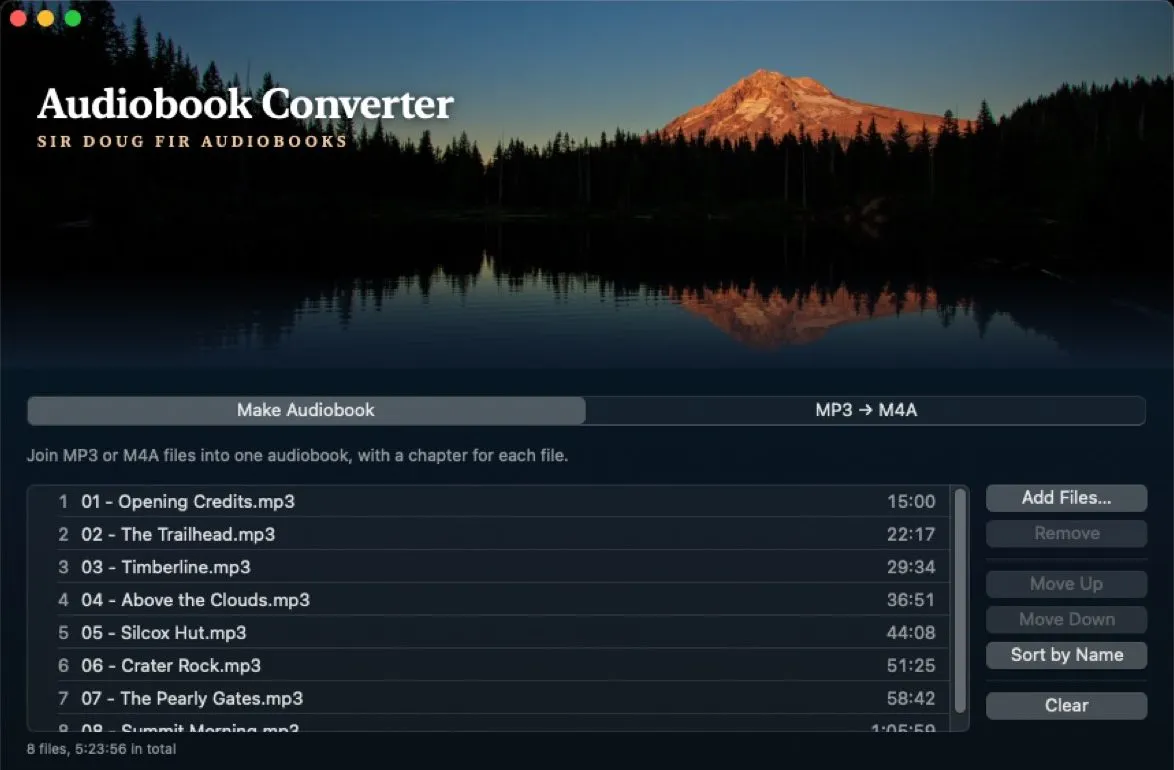
Drop in the chapter files, MP3 or M4A, and it combines them into one M4B audiobook. Each file becomes a marked chapter, so the book plays straight through and you can still skip between chapters. Add a title, author and cover, and it all shows up in Apple Books, Audiobookshelf, BookPlayer, Plex with Prologue, Smart AudioBook Player on Android and VLC.
You can also combine several whole audiobooks into one file, with one chapter per book.
STAGE 2 · THE SIDE QUESTS
It also converts MP3 files to M4A, and you can put one cover image on a whole batch at once.
STAGE 3 · THE SKIN
I didn’t want it to look like every other app, so it’s wearing one of my own photos: Mount Hood at dusk, glowing over a lake. The app’s colours come straight from that photo.

GAME OVER?
Nope. It’s coming soon for Mac. Check out the Audiobook Converter page, and hit subscribe below to hear when it’s ready.